Unit 1 · Lesson 4

Binary Numbers

FRQ · Warm-Up

Two Symbols, How Far Can They Go?

Last class, we built our own number system out of circles and squares.

What are some things we can communicate with only two symbols? Is there a limit?

Exploration

Today, We Explore Binary Numbers

Every computer you have ever used, from a phone to a supercomputer, stores and moves information using only two symbols. Today we find out just how far two symbols can go.

🧑‍🤝‍🧑 Activity · Get Ready

Head to Your Tables

Get back into your pairs from last class. You will need the patterns you built together.

Recap · One Place

One Place, Two Patterns

With only one spot to fill, a circle-and-square system can make just two different patterns.

Recap · Two Places

Two Places, Four Patterns

Add a second place, and the number of possible patterns doubles.

Recap · Three Places

Three Places, Eight Patterns

Add a third place, and it doubles again.

Big Idea

We Can Number Each Pattern

Line the patterns up in order, and give each one a number.

0
1
2
3
4
5
6
7

Note: computer scientists like to start counting at 0, not 1.

Think About It

Instead of two shapes, what if we had ten?

One Place, Ten Digits

One Place, Ten Patterns

With ten different shapes to choose from, one place can show ten different patterns: 0 through 9.

0
1
2
3
4
5
6
7
8
9

These are still just shapes. We only use the marks 0-9 because they are familiar.

Two Places, Ten Digits

Two Places, One Hundred Patterns

Add a second place, and those ten shapes combine into one hundred different patterns.

00
01
02
03
04
05
06
07
08
09
10
11
12
13
14
15
16
17
18
19
20
21
22
23
24
25
26
27
28
29
30
31
32
33
34
35
36
37
38
39
40
41
42
43
44
45
46
47
48
49
50
51
52
53
54
55
56
57
58
59
60
61
62
63
64
65
66
67
68
69
70
71
72
73
74
75
76
77
78
79
80
81
82
83
84
85
86
87
88
89
90
91
92
93
94
95
96
97
98
99
🖊️ Whiteboards · Pop Quiz

What Comes Next?

Grab a whiteboard.

0 9 9    _ _ _

Write down what comes next.

Answer

What Comes Next?

0 9 9    1 0 0

When every place runs out of digits at the same time, a brand-new place appears.

Big Picture

Where is all of this heading?

Binary

Big Idea

"Binary" Is Just a System With Two Shapes

0
1

Computer scientists call each digit a bit, short for binary digit.

Big Idea

Making Organized Lists Is Counting in Binary

The same eight patterns from before, numbered 0 through 7, are really just the binary numbers 000 through 111.

0
1
2
3
4
5
6
7
0 0 0
0 0 1
0 1 0
0 1 1
1 0 0
1 0 1
1 1 0
1 1 1
Explanation

How Does Counting in Binary Work?

It works the same way as counting in decimal, just with fewer digits to worry about. Both start at 0. Count up through all your digits, and when you run out in the rightmost column, start that column back at 0 and count up in the next column over. Repeat that pattern for every column.

DecimalBinary
00
91
1010
1911
20100
21101
Practice

What Comes Next?

DecimalBinary
131101
141110

How can we figure out the binary representation of a number?

Hands-On · Flippy-Do

Making a Flippy-Do!

The Flippy-Do is a tool that will help you convert between decimal and binary by hand.
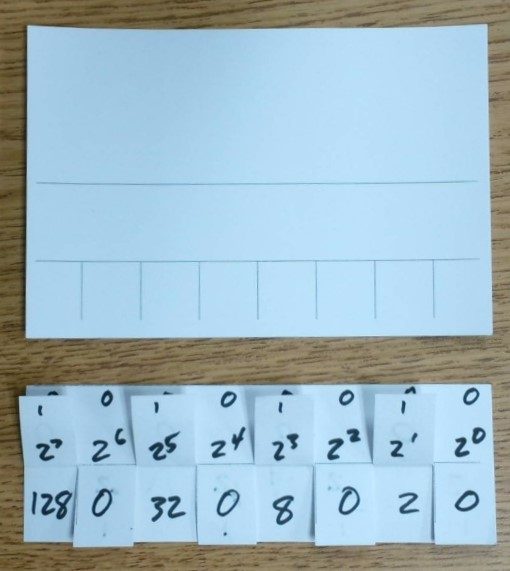
Blank index card and cut place-value flaps used to build a Flippy-Do
Step 1 of 13

Making a Flippy-Do!

Get a 3"×5" index card. Write your name in the big section on top.
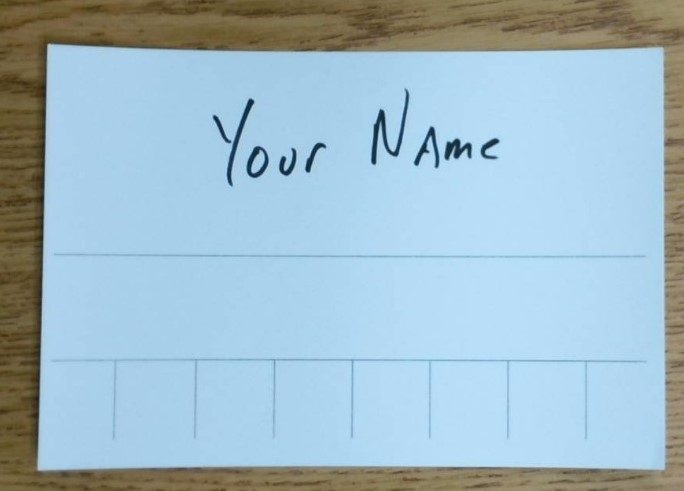
Index card with name written in the top section
Step 2 of 13

Making a Flippy-Do!

Fold the section with your name on it backwards, along the line.
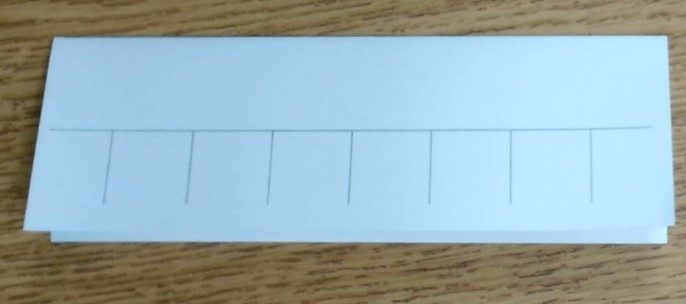
Index card folded backward along the first line
Step 3 of 13

Making a Flippy-Do!

Fold the front flap up along the horizontal line.
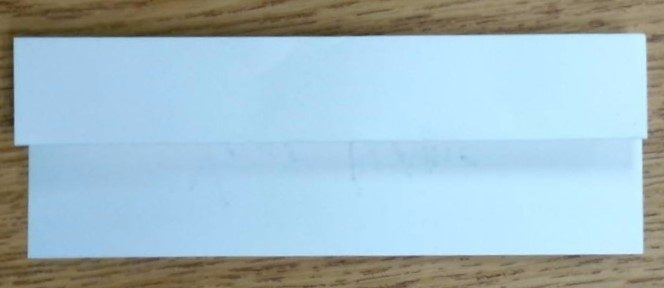
Front flap folded up along the horizontal line
Step 4 of 13

Making a Flippy-Do!

Fold that flap back down. Cut the top flap along the vertical lines, stopping at the fold you just made.
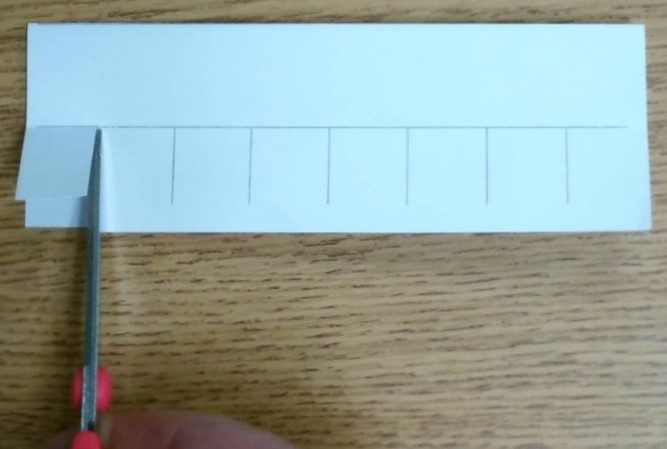
Cutting the top flap along the vertical lines
Step 5 of 13

Making a Flippy-Do!

You will now have 8 small flaps.
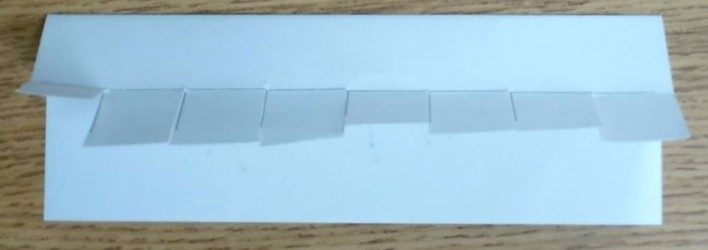
Card with 8 small cut flaps
Step 6 of 13

Making a Flippy-Do!

Unfold the card. It now has 3 sections: the top section with 8 flaps, a smaller middle strip, and a large bottom section. Spread glue along the middle strip and fold it closed again. This gives you a half-sized card with flaps along the bottom on the front, and your name on the back.
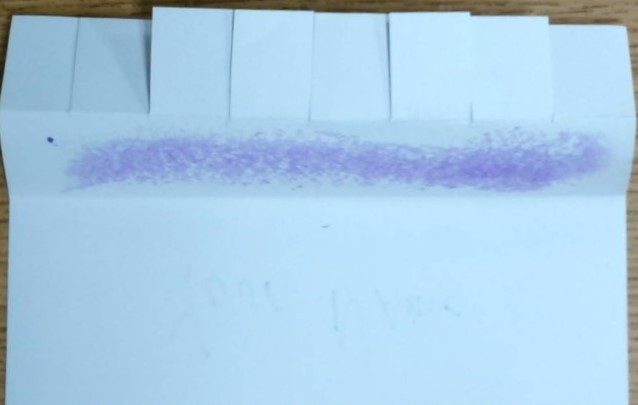
Glue spread along the middle strip before refolding
Step 7 of 13

Making a Flippy-Do!

Write a 0 in each of the flaps.
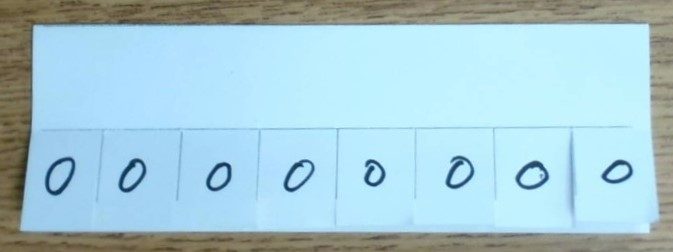
A zero written on each of the 8 flaps
Step 8 of 13

Making a Flippy-Do!

Along the top edge, directly above each of the 0s you just wrote, write another small 0.
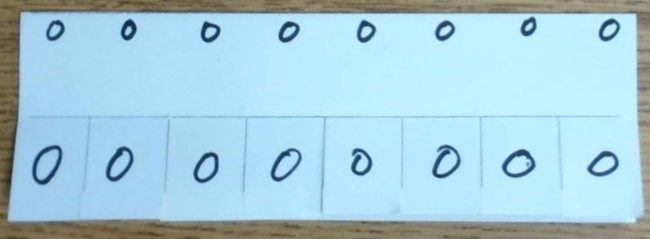
A second row of zeros written above the flaps
Step 9 of 13

Making a Flippy-Do!

Below the top row of 0s and above the flaps, write out the series of exponents of 2, starting with 20 on the right and ending with 27 on the left.
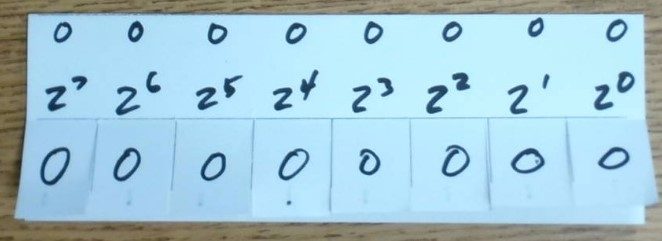
Exponents of 2 written above the flaps, from 2^7 on the left to 2^0 on the right
Step 10 of 13

Making a Flippy-Do!

Flip up the flaps. Along the top of each one, write a 1, the same size as the small 0s from Step 7.
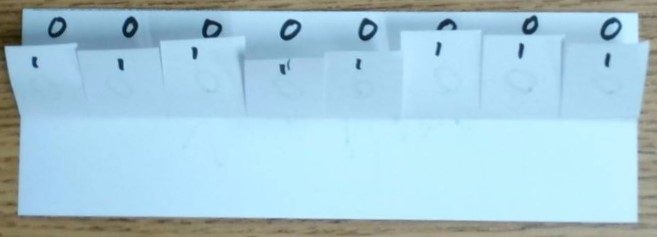
A one written on the top of each flipped-up flap
Step 11 of 13

Making a Flippy-Do!

Below the 1, write out the series of exponents again, starting with 20 on the right and ending with 27 on the left.
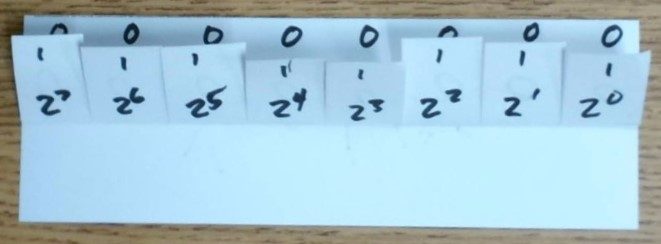
Exponents of 2 written a second time, below the flipped-up flaps
Step 12 of 13

Making a Flippy-Do!

In the space below the flaps, write out the value of each exponent, with 1 on the right, ending with 128 on the left.
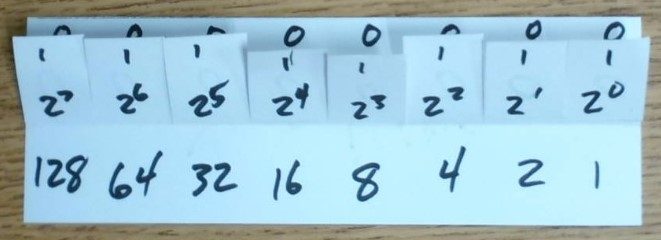
Place values 128, 64, 32, 16, 8, 4, 2, 1 written below the flaps
Step 13 of 13

Making a Flippy-Do!

You now have a working Flippy-Do. Create a binary number along the top, and add up the numbers on the bottom to find its decimal value.
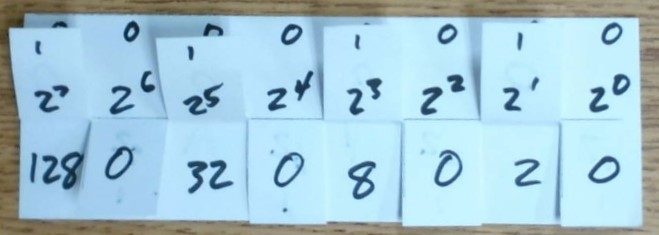
10101010
Finished Flippy-Do showing the binary number 10101010
128 + 0 + 32 + 0 + 8 + 0 + 2 + 0
= 170
Bonus

Making a Flippy-Do!

Step 14. There is no step 14. Congratulations, you now have a working Flippy-Do!
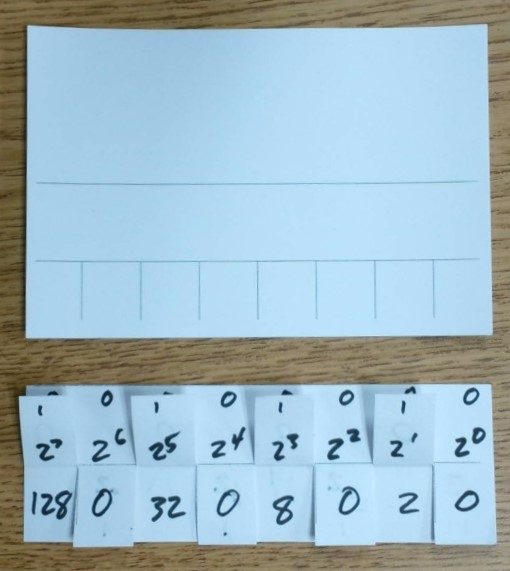
The completed Flippy-Do materials
Using Your Flippy-Do

Eight Bits Make a Byte

Each column represents one place in a binary number, called a bit (short for binary digit). Each bit can be a 0 or a 1. Your Flippy-Do has 8 columns, 8 bits, which together make one byte.

Binary Number
0
0
0
0
0
0
0
0
Place Values
27
26
25
24
23
22
21
20
0
0
0
0
0
0
0
0
Worked Example

Reading a Binary Number

Make the top row of your Flippy-Do look like the binary number 0001 0010.

To make long binary numbers easier to read, we split the digits into groups of four, the same way commas split decimal digits into groups of three, like in 1,453,334.

Binary Number
0
0
0
1
0
0
1
0
Place Values
27
26
25
24
23
22
21
20
0
0
0
16
0
0
2
0

16 + 2 = 18

The Other Direction

Converting Decimal to Binary

To go the other way, use your Flippy-Do to work through your number one place at a time.

  1. Flip every bit up.
  2. Flip down any place value bigger than your number.
  3. Subtract the biggest value left from your number.
  4. Move to the next column and repeat.
  5. Stop when you hit 0, and flip any remaining flaps to the right back down.
Worked Example

Converting 5 to Binary

We start with the number 5 and step through each place value, from left to right.

Binary Number
1 0
1 0
1 0
1 0
1 0
1 1
1 0
1 1
Place Values
27
26
25
24
23
22
21
20
128 0
64 0
32 0
16 0
8 0
4 4
2 0
1 1

Is 128 bigger than 5? Yes, flip it down.

Is 64 bigger than 5? Yes, flip it down.

Is 32 bigger than 5? Yes, flip it down.

Is 16 bigger than 5? Yes, flip it down.

Is 8 bigger than 5? Yes, flip it down.

Is 4 bigger than 5? No, keep it. 5 − 4 = 1. Keep going, but now with 1 instead of 5.

Is 2 bigger than 1? Yes, flip it down.

Is 1 bigger than 1? No, keep it. 1 − 1 = 0. We hit 0, so we stop, flipping any flaps to the right back down. (There are no flaps to the right in this case.)

5 = 0000 0101, or just 101

Practice · Predict First

What's the Decimal Value?

Here's a binary number: 0001 1010

Before we work it out: what do you predict this equals in decimal? Talk with your partner, then write your guess on your whiteboard.

Binary Number
0
0
0
1
1
0
1
0
Place Values
27
26
25
24
23
22
21
20
0
0
0
16
8
0
2
0

16 + 8 + 2 = 26

Practice · Predict First

What's the Binary Value?

Let's convert the number 36 to binary, an even number this time.

Before we work it out: what do you predict this looks like in binary? Talk with your partner, then write your guess on your whiteboard.

Binary Number
1 0
1 0
1 1
1 0
1 0
1 1
1 0
1 0
Place Values
27
26
25
24
23
22
21
20
128 0
64 0
32 32
16 0
8 0
4 4
2 0
1 0

Is 128 bigger than 36? Yes, flip it down.

Is 64 bigger than 36? Yes, flip it down.

Is 32 bigger than 36? No, keep it. 36 − 32 = 4. Keep going, but now with 4 instead of 36.

Is 16 bigger than 4? Yes, flip it down.

Is 8 bigger than 4? Yes, flip it down.

Is 4 bigger than 4? No, keep it. 4 − 4 = 0. We hit 0 with two columns still to go, so we flip the 2 and 1 flaps down together, without even checking them.

36 = 0010 0100

Wrap Up

Two Ways to Write the Same Number

Decimal Number: a base 10 number with 10 possible digits, 0 through 9.

101100
101
23

Binary Number: a base 2 number with 2 possible digits, 0 and 1.

2423222120
168421
10111

23 in decimal is 10111 in binary.

Both forms represent the same value.

We just have two different ways to write it.

📋 Activity · 1.4 Activity Guide

Complete the Activity Guide

Work with your partner and your Flippy-Do to complete the 1.4 Activity Guide.

When you're finished, press to try and stop the Binary Breach.

Activity · Binary Breach

Binary Breach

Put your new skills to the test. Restore the systems by converting between binary and decimal, just like you did with your Flippy-Do.